 Stack Overflow
 LinkedIn
 GitHub
A small effect that follows the pointer can make a page feel a bit alive. I built one as a library and published it on npm: magic-cursor-wand.
What you get is simple to describe: chalk lines, glitter and soft clouds that follow the pointer on any web page. You can add it with one script tag, without a build step, or with one function call if your project uses a bundler.
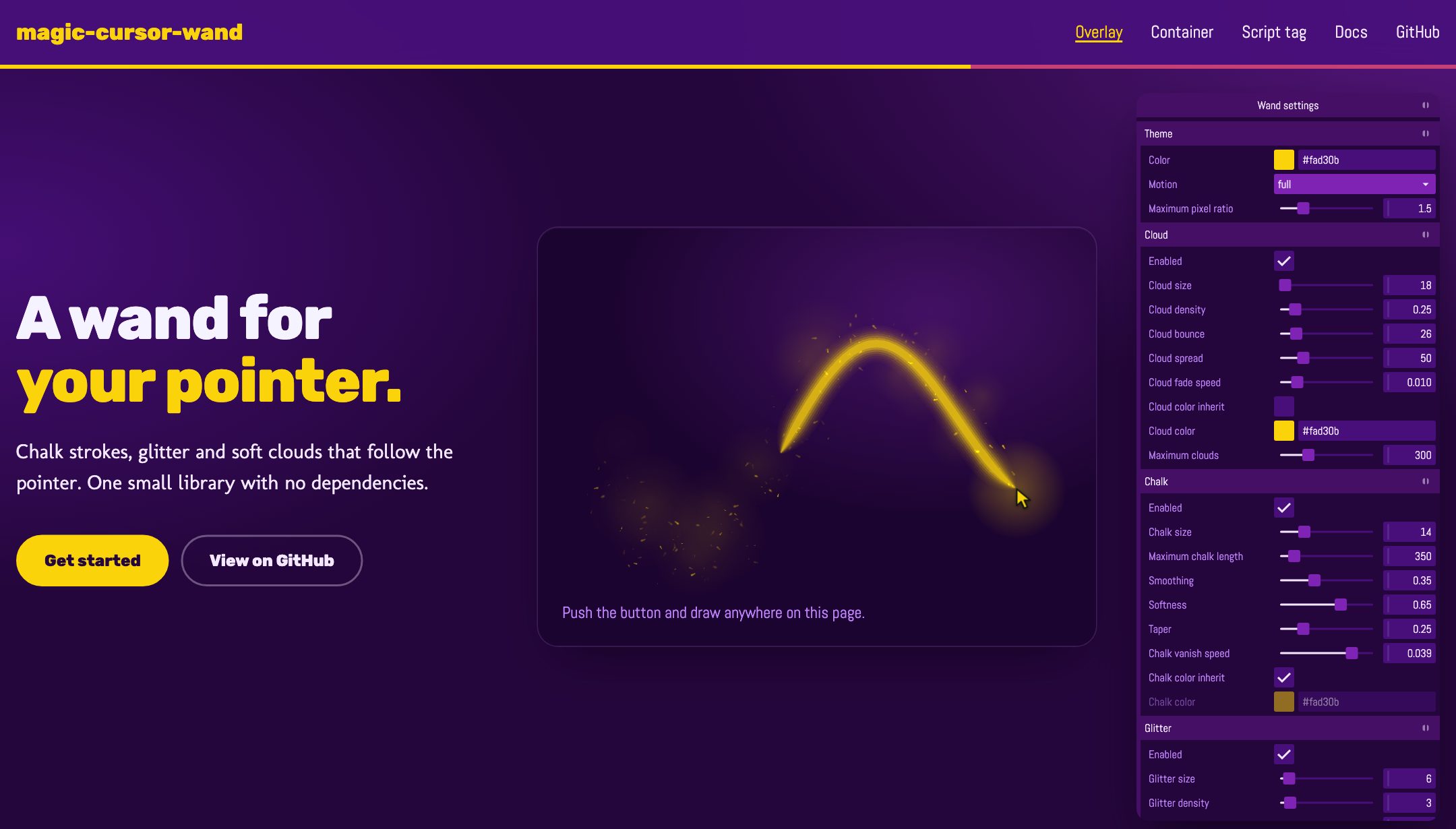
The best way to understand it is to play with it. Open the live demo, move the pointer, hold the button down to draw, and change the sliders in the settings panel.
What it does
There are three built-in effects:
- Chalk: a chalk line while you hold the pointer button down. The line fades after a short time.
- Glitter: small particles that twinkle, turn and fall.
- Cloud: soft clouds that rise and fade near the pointer.
All of them draw on a canvas. If you never worked with it, a canvas is an HTML element that works like a blank sheet where JavaScript can paint pixels directly. The library puts one canvas on top of the page and sets pointer-events: none on it, so your links and buttons below it continue to receive clicks as usual.
Start in one minute
With a script tag
If you have a static page, a blog or anything without a bundler, add this element at the end of the body:
<script
  src="https://cdn.jsdelivr.net/npm/[email protected]/dist/magic-cursor-wand.iife.js"
  integrity="sha384-XxBXqYPuFEcQp51OYVOK/CslqB4ooezSzEvohIGISSD4E7Gxi3IOg09R3e/wKmF5"
  crossorigin="anonymous"
  data-wand-storage-key="my-site-wand"
  data-wand-cursor="glow"
></script>
A few things are happening here:
- The
integrityattribute holds a hash of the published file. The browser compares the file it downloads with this hash and refuses to run it if they are different. Thus the browser runs only the published file. data-wand-storage-keykeeps each visitor’s settings inlocalStorage, so they stay after the visitor closes the page.data-wand-cursor="glow"adds a glow around the pointer. The build adds it only on devices with a pointer that can hover, like a mouse.
With a bundler
If your project uses npm and a bundler, install the package:
npm install magic-cursor-wandAnd create the wand:
import { createWand } from 'magic-cursor-wand';

const wand = createWand();
That is it. To remove the canvas and all listeners later, call wand.destroy(). There is also a React hook, useWand, in magic-cursor-wand/react, which removes the wand when React removes the component.
Make it yours
Each effect has its own settings, and each setting has safe limits. You pass the values you want to change and keep the defaults for the rest:
createWand({
  config: {
    theme: { color: '#7e23b3' },
    chalk: { size: 20, taper: 0.5 },
    glitter: { spawnRate: 6 },
  },
});
If you prefer to tune the values by eye, open the demo, move the sliders and export the result. All fields and their limits are in the configuration reference.
A few technical highlights
I tried to keep the library small and polite with the page that uses it. These are the parts I think are worth a mention:
- No dependencies in the core. The canvas sleeps when nothing moves, and the frame loop also stops while the page is not visible. Each effect has a limit for its particles.
- Safe on strict pages. A Content Security Policy (CSP) is a set of rules a site sends to the browser to say which scripts and styles it may run. The library sets styles with
element.styleonly and makes no network requests, so the core and the effects need no change to the policy. - Providers for the settings. A provider is a small object that loads settings from somewhere and, if you want, saves them back. The package has providers for
localStorage, an HTTP endpoint and a server event stream. After each change, the wand saves the settings automatically. - Plugins and your own effects. A plugin adds a feature without drawing on the canvas. The cursor glow and the settings panel are plugins. Effects, plugins and providers are all small objects, so you can write your own without a change to the core.
- Kind to each visitor. Some people ask their operating system to reduce motion on screen. Set
theme.motiontoauto, and the wand obeys theprefers-reduced-motionmedia query: glitter and clouds turn off, and the chalk line fades without drift.
Here is how a provider looks in code. This one keeps the settings of each visitor in the browser:
import { createWand } from 'magic-cursor-wand';
import { localStorageProvider } from 'magic-cursor-wand/providers';

const wand = createWand({
  providers: [localStorageProvider({ key: 'my-site-wand' })],
});
The library works in Chrome and Edge 88, Firefox 85, Safari and Safari on iOS 14.5, and later versions. It is MIT licensed.
Try it
If you want to see it before you read anything else, the live demo is the place. The documentation has a getting-started guide, how-to pages and the full API reference. The package is on npm, and the source code is on GitHub.
If you put the wand on one of your pages, or you have an idea for a new effect, open an issue on GitHub or leave a comment below. I would be happy to see what you make with it.
Comments
Comments are hosted by Disqus, which sets cookies and shares data with Disqus. Load comments? Read the privacy page for details.